



The Sudden Silence: Waking Up to a Hot House
You wake up in the middle of the night, and your house is completely silent. Your cooling system isn't humming, and the air in your bedroom already feels thick, stuffy, and uncomfortably warm. You walk over to the nearest vent, hold your hand up to the grate, and feel absolutely nothing. In that exact moment, a sinking feeling sets in. Your mind immediately jumps to the worst-case scenario: a blown compressor, a dead motor, or a complete system failure that will require a massive replacement project.
If you need immediate assistance restoring your home's comfort, you can explore our comprehensive air conditioning services. However, before you pick up the phone in a panic, it is important to pause and evaluate the situation. The oppressive late-summer August heat and heavy humidity can easily cloud your judgment, making an unexpected shutdown feel like an immediate, catastrophic emergency.
The truth is, a completely silent system does not automatically mean your heavy machinery has failed. There is a massive difference between a mechanical breakdown in your outdoor condenser and a simple communication error inside your hallway. More often than you might think, perceived HVAC breakdowns are actually minor user errors or temporary glitches originating from the control unit on your wall. Understanding how to tell the difference can save you time, stress, and a frantic late-night service call.
The Psychology of an August Breakdown
By the time late summer rolls around, your cooling equipment has been running hard for months. This extended period of heavy operation creates cooling season fatigue, not just for the machinery, but for the people living in the house. You become hyper-sensitive to every slight change in temperature, airflow, and background noise. When the system suddenly stops responding, that heightened awareness quickly turns into frustration and fear.
This anxiety is incredibly common. One local homeowner experienced a complete system shutdown on a sweltering summer day. Because their equipment was out of its original warranty, they immediately assumed the worst and braced for a massive replacement bill. Fortunately, a professional technician arrived, diagnosed the underlying issue, managed to get the unit covered under a manufacturer warranty, and resolved the situation swiftly. What felt like a total disaster was actually highly manageable.
Much of this panic stems from how modern households interact with their climate controls. During a heatwave, multiple family members often adjust the temperature throughout the day to combat the weather. One person turns it down in the afternoon, another sets a schedule for the evening, and someone else hits a manual override before bed. This constant tampering frequently leads to conflicting schedules and accidental lockouts. Even the most reliable, heavy-duty cooling system will sit completely idle if the sensitive control unit on the wall is misconfigured. If you find yourself completely stuck, professional AC repair in Cinnaminson is always available to sort out the confusion.
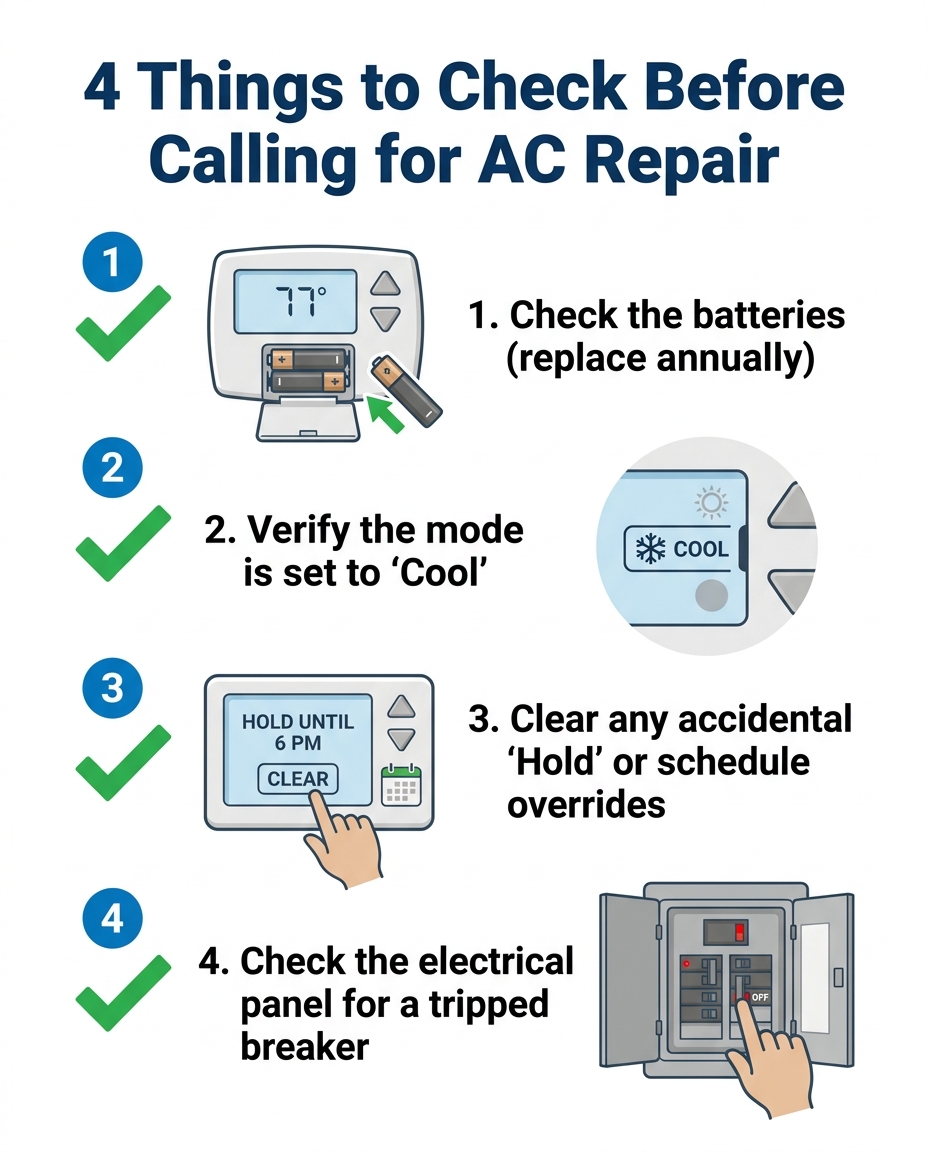
4 Things to Check Before Calling for Repair
Before you request an emergency diagnostic visit, there is a safe, non-technical troubleshooting process you can perform right now. Walking through these simple steps helps rule out basic user errors and prevents you from paying a service fee for a two-minute fix. If you want to understand more about your system's behavior, you can also read about why your AC might be running constantly during peak weather.
Step 1: Inspect the Power Source and Batteries
Most homeowners forget that many wall units rely on standard AA or AAA batteries to maintain their digital displays and internal memory. Even if your system is hardwired to the house, batteries often act as a necessary backup.
• Locate the compartment: Gently pull the faceplate off the wall mount or look for a small sliding door on the side or bottom of the unit.
• Watch for fading displays: A dying battery often causes the digital screen to fade, flicker, or become entirely blank.
• Test the response time: Low power can cause the unit to ignore your button presses or delay sending the startup signal to the heavy equipment outside. Replace the batteries with fresh ones to see if the screen reboots.
Step 2: Review Schedules and Overrides
Modern programmable units are designed to follow strict daily schedules, but human interference often disrupts those plans.
• Check for 'Hold' commands: If someone manually lowered the temperature and pressed "Hold," the system might freeze in that setting or refuse to transition to the next scheduled cooling cycle.
• Look for vacation mode: A stray button press can easily activate a vacation or away mode, which intentionally prevents the system from running to save energy.
• Clear the memory: Navigate to the schedule settings and cancel any temporary overrides to return the system to its normal operating rhythm.
Step 3: Verify the Mode Switch
It sounds incredibly simple, but a bumped switch is a leading cause of perceived system failures. While dusting the hallway or walking past in the dark, someone can easily brush against the control panel.
• Confirm the 'Cool' setting: Ensure the main selector switch is firmly clicked into the "Cool" position. If it is resting halfway between "Cool" and "Off," the internal contacts will not connect, and the system will remain silent.
• Check the fan setting: Make sure the fan is set to "Auto" rather than "On," which can sometimes cause the blower to circulate unconditioned, warm air through the house, tricking you into thinking the compressor is broken.
Step 4: Inspect the Household Electrical Panel
If your wall unit is completely hardwired without battery backup, a blank screen usually means it has lost electrical power from the house itself.
• Locate your breaker box: Open your main electrical panel and look for the switches labeled for your HVAC equipment.
• Identify a tripped breaker: A tripped switch will not be completely in the "Off" position; it usually rests slightly out of line with the others in the middle.
• Reset the circuit: Firmly push the switch entirely to the "Off" side until it clicks, and then push it back to the "On" position. If it trips again immediately, stop touching it and call a professional.

Symptoms of a Blank Thermostat vs. a Dead Compressor
To truly understand what is happening in your home, it helps to contrast the symptoms of a control issue with a genuine mechanical failure. The control unit on your wall uses a low-voltage communication wire—often carrying just 24 volts—to send operational signals to the heavy machinery outside. If that communication drops, the outdoor machinery simply waits for instructions that never arrive.
Separating the symptoms of a communication error from a mechanical breakdown prevents unnecessary panic. Here is a breakdown of what to look and listen for when troubleshooting your system in Cinnaminson NJ:
• Completely blank digital screen — Likely Culprit: Thermostat Issue — What It Means: The wall unit has lost power due to dead batteries or a tripped household breaker.
• Screen is on, but system ignores inputs — Likely Culprit: Thermostat Issue — What It Means: The unit is locked in a schedule override, 'Hold' mode, or a vacation setting.
• Audible click at the wall, but silence outside — Likely Culprit: Communication or Mechanical — What It Means: The wall unit is sending the signal, but the outdoor contactor or capacitor has failed.
• Outdoor unit buzzes or hums loudly but fan won't spin — Likely Culprit: Mechanical Issue — What It Means: The compressor or fan motor is struggling to start, indicating a failing capacitor or seized motor.
• System runs, but air from vents is warm — Likely Culprit: Mechanical Issue — What It Means: The control unit is working fine, but the system has a refrigerant leak or a dirty evaporator coil.
The takeaway: If your screen is blank or frozen, the problem is almost certainly inside the house. If the screen is brightly lit, the settings are correct, and you hear a physical "click" from the wall when the temperature drops, but the outdoor unit sounds terrible or refuses to start, you are looking at a mechanical failure.
Why True Professionals Prefer You Check the Batteries
There is an elephant in the room when it comes to the HVAC industry: some contractors might exploit a blank digital screen for an easy service call fee. When a homeowner is panicked by the late-summer August heat, they are often willing to pay whatever it takes to get the cool air flowing again. An unethical technician could arrive, swap out two AA batteries, reset a breaker, and hand over an invoice for a full diagnostic visit.
An honest, transparent local team operates entirely differently. At Climate Mechanics, our technicians will honestly identify a dead battery or a bumped switch rather than using it as an opportunity for upselling. We would much rather teach you these simple DIY checks over the phone or through educational guides to save you time and money. Building long-term trust with our community is vastly more important than collecting a quick diagnostic fee for a two-minute, non-technical fix.
When you know how to rule out the basic errors yourself, you can call for help with total confidence, knowing a real repair is actually needed. One customer reached out on a Sunday evening when their unit stopped working unexpectedly. Because they had already checked the basics, they knew professional help was required. A technician was dispatched quickly and had the system fully operational within an hour. That is the level of service you receive when you work with a team that values integrity over quick profits.
When It's Time to Call in the Experts
While checking batteries and verifying schedules is perfectly safe for any homeowner, there are hard limits to DIY troubleshooting. You should never open the metal HVAC cabinet, attempt to splice high-voltage electrical wires, or handle chemical refrigerants. Once you have ruled out user error, it is time to step back and let a licensed professional take over.
You need to schedule a professional diagnostic visit if you observe any of the following warning signs:
• The breaker trips repeatedly: If you reset the circuit breaker and it immediately snaps back to the middle position, you have a dangerous electrical short that requires professional testing.
• Strange mechanical noises: Grinding, squealing, or loud buzzing sounds from the outdoor condenser indicate failing motors or electrical components.
• Warm air from the vents: If the wall unit is powered and set correctly, but the air blowing into the rooms is noticeably warm, the system is suffering from a mechanical or refrigerant issue.
• Short cycling: If the system turns on for two minutes, shuts off abruptly, and immediately restarts, the machinery is actively protecting itself from internal damage.
During a diagnostic visit, a professional technician will use specialized multimeters to test the 24-volt communication wire, inspect the outdoor capacitor, and measure the electrical draw of the compressor. Addressing these mechanical issues promptly in Cinnaminson NJ not only restores your comfort today but also prepares your entire system for the upcoming seasonal transition, ensuring you won't need unexpected professional furnace repair when the weather finally turns cold.
Preventing Future Thermostat Trickery
The best way to avoid the sudden panic of a silent house is to implement a few proactive habits. Treat your control unit with the same care you give the heavy machinery outside. We recommend changing the batteries annually, regardless of whether the low-battery light is flashing. Tying this simple task to a memorable date—like the start of the school year or when you change your smoke detector batteries—ensures it never slips your mind.
Additionally, keep the wall unit gently dusted with a dry microfiber cloth. Ensure that no new furniture, lamps, or electronics have been placed directly underneath it, as the heat rising from a television or a bright lamp can trick the internal sensors into reading the room hotter than it actually is. If your home uses smart technology, take advantage of the digital locking features. Setting a simple PIN code prevents accidental family overrides and keeps your carefully planned schedules intact.
Finally, the most effective prevention strategy is routine, comprehensive care for the entire system. An HVAC maintenance program allows a professional to catch both minor control glitches and major mechanical wear before they cause a shutdown during the late-summer August heat. By keeping the communication lines clear and the machinery clean, you ensure your home remains consistently comfortable all season long.
Frequently Asked Questions
How do I know if my thermostat is bad or the AC?
The easiest way to tell is by looking at the digital display and listening for a click. If the screen is completely blank or unresponsive to new batteries, the control unit is the issue. If the screen is on, you hear a click from the wall when adjusting the temperature, but the outdoor unit makes loud humming noises or fails to start, the AC machinery is the problem.
Can a dead thermostat battery stop the AC from working?
Yes, absolutely. Even if your cooling system is hardwired to your home's electrical panel, the wall unit often requires batteries to power its internal relays and digital screen. When those batteries die, the unit loses its ability to send the startup signal to the outdoor compressor, leaving your system completely silent.
Why is my thermostat blank but the AC is running?
If the screen is blank but the blower fan is still pushing air through the vents, the batteries have likely died while the system was in the middle of a cooling cycle. The system may continue to run based on its last known command, or the fan switch may be stuck in the "On" position. Replacing the batteries usually restores full control.
How to tell if a thermostat is broken?
A broken unit will typically display a faded screen, fail to respond to button presses, or lose its programmed schedule frequently. If you have replaced the batteries, verified that the household circuit breaker is on, and the screen remains completely dark or unresponsive, the internal wiring or the unit itself has likely failed.
Will a tripped circuit breaker cause my thermostat to lose power?
Yes, if your control unit relies on a hardwired 24-volt connection from the indoor air handler rather than batteries. If the main circuit breaker for your indoor HVAC equipment trips, it cuts off the power supply to the transformer, which instantly causes the wall display to go blank.
